
iPad as a Creative Tool for Artists: Comparing Apple Pencil 3, Procreate and Modern Alternatives
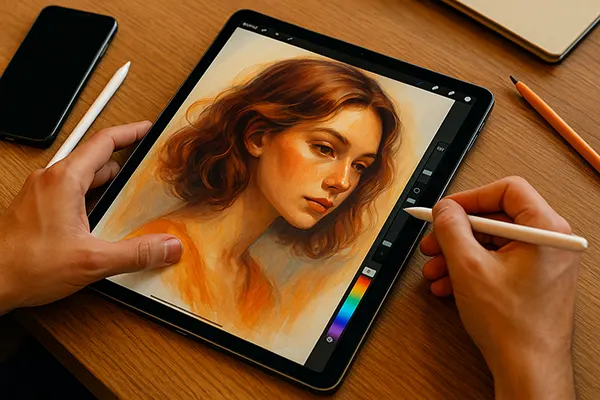
The iPad has evolved into a mature workspace for illustrators and designers, offering precision tools, advanced apps and seamless integration with professional workflows. As digital artistry expanded throughout 2024–2025, Apple’s hardware and software ecosystem introduced notable updates, particularly with the Apple Pencil 3 and the continuous refinement of high-performance creative apps. This article examines how these components function in real day-to-day tasks and what artists can realistically expect from them in 2025.
Apple Pencil 3 Features and Real-World Performance
The Apple Pencil 3 arrived with a redesigned sensor system, improved hover accuracy and a more durable tip architecture. These updates allow illustrators to create detailed shading, apply consistent pressure response and work for extended sessions without calibration issues. Its activation latency remains one of the lowest in the market, which helps to maintain a natural drawing rhythm even with rapid strokes.
Magnetic charging and interchangeable tip textures introduced in 2025 expanded its versatility for different drawing styles. Soft brush-like tips offer smoother motion for concept art, while firm tips help technical illustrators produce clear, defined lines. More importantly, tip wear became noticeably slower than previous generations, reducing long-term maintenance costs for professionals.
The Pencil 3 also supports refined tilt recognition, especially on iPad Pro models with the M4 chip. This results in realistic transitions during heavy shading and complex cross-hatching. For tasks requiring controlled precision, such as architectural drafting or character lineart, the tool behaves consistently even under fast pressure variation conditions.
Limitations and Compatibility Considerations
Despite its improvements, the Apple Pencil 3 remains limited to the latest iPad generations, meaning artists using older models may need to upgrade their hardware to access full functionality. Compatibility varies across the Air, mini and standard iPad ranges, creating additional factors to consider for long-term budgeting.
Another aspect to note is that custom replacement tips from third-party brands may behave unpredictably with the Pencil 3’s advanced sensors. Texture sensitivity and pressure curve distortions can appear when using low-quality accessories, which may affect line consistency in professional projects.
For artists working outdoors or in mobile environments, battery performance still depends heavily on the iPad model. Although Apple improved communication efficiency between Pencil and tablet, extended drawing sessions at high brightness can reduce stability. Power banks or portable chargers remain essential for field sketching tasks.
Procreate in 2025: Capabilities for Illustrators and Designers
Procreate continues to be a leading app for digital drawing on iPad, especially after the 2024–2025 updates, which shifted the application toward high-resolution project handling and improved file recovery. Artists using complex layers and large canvases notice greater stability, supported by hardware acceleration and memory optimisation on modern iPad chips.
The brush engine received a number of refinements allowing for more consistent texture rendering at extreme zoom levels. Brushes now behave predictably under different pressure profiles, which benefits concept artists, tattoo designers and illustrators who rely on detailed micro-shading. Procreate remains an accessible entry point for anyone who wants a reliable and flexible workspace without a steep learning curve.
With 2025’s update, the app enhanced 3D painting tools and expanded support for animation workflows. While it may not replace full professional animation software, its features allow designers to develop storyboards, loops and short motion projects directly from the iPad, helping streamline early stages of creative production.
Where Procreate Still Falls Short
Although Procreate provides a powerful toolkit, its file export options remain somewhat limited for large-scale print projects or complex vector workflows. Artists focusing on commercial packaging, billboard-size prints or technical diagrams may need supplementary software to ensure full colour-profile accuracy.
The app also does not include a native full-vector environment. While it supports vector-like brushes, precision-oriented fields such as logo design or map illustration require a dedicated vector tool. This means some professionals maintain a hybrid workflow between iPad and desktop platforms.
Collaboration features remain basic compared with cloud-centric design systems. Procreate focuses on individual creation rather than multi-user editing. As a result, teams working on collaborative production pipelines may need external tools to manage assets, revisions and shared projects.

Modern Alternatives to Apple Pencil and Procreate
Apart from Apple’s official tools, artists in 2025 have access to a wide selection of styluses, software and hybrid approaches. Apps such as Clip Studio Paint, Affinity Designer 2 and Adobe Fresco provide advanced features for specialised workflows, especially for illustrators who transition between raster and vector tasks.
Third-party styluses like Adonit Note+ 2 and Logitech Crayon (2024 edition) offer more affordable options with commendable pressure sensitivity. While they do not match the responsiveness of the Apple Pencil 3, they remain suitable for beginners or professionals who need an emergency backup tool.
For artists requiring cross-platform synchronicity, cloud-integrated creative systems help maintain consistent progress across devices. Sketchbook, Concepts and Fresco allow users to move between tablets, laptops and desktops without disrupting the workflow. This flexibility is especially beneficial for freelancers handling multiple client environments.
Choosing the Right Combination for Professional Work
The ideal setup depends on the type of art an individual creates. Character illustrators benefit most from the Apple Pencil 3 combined with Procreate or Clip Studio Paint, as these tools prioritise line stability and texture control. Technical artists, however, may prefer hybrid workflows that include Affinity Designer or Concepts for precise vector construction.
Budget also plays a significant role. While Apple’s ecosystem offers unparalleled integration, high-quality third-party tools remain valuable, particularly for students or beginners exploring their creative path. The best approach involves balancing long-term goals with immediate project requirements.
When working on professional assignments in 2025, reliability, export options and colour accuracy remain essential. Artists should review each app’s capabilities, expected output formats and hardware compatibility to ensure their setup meets industry expectations without unnecessary compromises.