
Live Translation in the Apple Ecosystem: How It Works Across Messages, FaceTime, Phone and AirPods
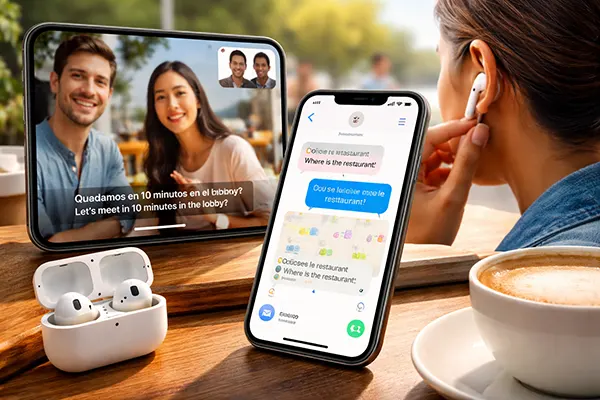
Apple’s approach to live translation has shifted from simple text conversion to a system deeply integrated into everyday communication tools. By 2026, translation features are no longer limited to standalone apps — they are embedded directly into Messages, FaceTime, Phone calls and even AirPods, making multilingual interaction more natural in real-life situations. This article focuses on practical use: where translation works reliably, where delays appear, and when it is better not to rely entirely on automation.
How Live Translation Works in Messages, FaceTime and Phone
In Messages, live translation operates directly within conversations. When enabled, incoming messages in a foreign language can be automatically translated into the user’s preferred language, while replies are translated back before being sent. This reduces friction in everyday chats, especially in international work or travel scenarios. Importantly, Apple processes much of this locally on-device, which improves privacy and reduces reliance on cloud latency.
FaceTime introduces a more complex scenario. During video calls, real-time captions can appear with translated text. The system relies on speech recognition first, then applies translation. While the experience is generally smooth for clearly spoken languages like English, French or Spanish, it can struggle with overlapping speech, accents or unstable connections. A slight delay — usually one to three seconds — is still noticeable in longer conversations.
Phone calls follow a similar principle but without visual context. Translation happens through voice recognition and audio playback. In practice, this means the conversation becomes slightly segmented: one person speaks, the system processes, then delivers translated output. It works well for structured communication, such as customer support or booking services, but feels less natural in fast, emotional exchanges.
Where Translation Performs Well and Where It Slows Down
Live Translation is most reliable in controlled environments: quiet rooms, stable internet connections and standard vocabulary. In these conditions, Messages translation feels almost instant, and FaceTime captions remain readable and consistent. Business communication, scheduling and simple conversations benefit the most from this setup.
Performance drops in more dynamic contexts. Background noise, multiple speakers or informal speech patterns can reduce accuracy. In Phone calls, this becomes especially noticeable because there is no visual support — errors in translation can disrupt understanding entirely. Even in 2026, real-time speech translation still depends heavily on input clarity.
Latency is another factor. While Apple has optimised on-device processing, translation still introduces pauses. For casual conversations, this may feel acceptable, but for fast-paced dialogue — such as debates or negotiations — delays can break the natural rhythm of communication.
Using AirPods for Live Conversation Translation
AirPods, particularly newer generations, extend translation beyond screens. The concept is simple: one person speaks, the iPhone processes the speech, and the translated version is played directly into the listener’s AirPods. This creates a more immersive experience, especially in face-to-face conversations where constantly looking at a screen would be impractical.
In travel scenarios, this setup is particularly useful. Asking for directions, ordering food or handling hotel check-ins becomes more manageable without switching between apps. The hands-free aspect allows users to stay engaged in the interaction rather than focusing on the device itself.
However, this system still relies on the iPhone as the processing hub. AirPods do not perform translation independently. This means performance depends on the phone’s processing power, battery level and connectivity. In offline mode, capabilities are limited to pre-downloaded language packs.
Real-Life Use Cases: Travel, Work and Learning
For travellers, AirPods translation reduces basic communication barriers. It works best for short, functional exchanges — directions, purchases, simple questions. In longer conversations, the delay becomes more noticeable, but still manageable when expectations are realistic.
In professional settings, the feature can support initial communication across language barriers. For example, quick calls with international colleagues or suppliers can be handled without a human interpreter. However, for detailed negotiations or legal discussions, relying solely on automated translation remains risky.
Language learners can also benefit. Hearing both the original speech and the translated version helps build contextual understanding. It is not a replacement for structured learning, but it supports exposure to real-world language usage.

Limitations and When Not to Rely on Automatic Translation
Despite progress, Live Translation is not flawless. Context remains one of the biggest challenges. Idioms, cultural references and humour often lose meaning in automated translation. Even when the sentence is grammatically correct, the intent can shift, which may lead to misunderstandings.
Accuracy also varies by language pair. Widely used languages tend to perform better due to larger datasets and optimisation. Less common languages or dialects may produce inconsistent results. Users should be cautious when dealing with critical information such as medical, financial or legal content.
Privacy is another consideration. While Apple emphasises on-device processing, some features still rely on cloud support, especially for less common languages. This may be relevant for users handling sensitive information in professional environments.
Practical Advice for Using Live Translation in 2026
Use Live Translation as a support tool rather than a definitive source. It is highly effective for understanding general meaning and maintaining basic communication, but it should not replace human verification in important contexts.
Whenever possible, simplify speech. Short sentences, clear pronunciation and avoiding slang significantly improve translation quality. This applies equally to both speakers in a conversation.
Finally, be prepared for delays. Real-time translation is not truly instantaneous. Accepting small pauses as part of the process helps maintain a smoother interaction and avoids frustration during conversations.